AI (Artificial Intelligence) has a very common problem when writing code:
It loves to “hardcode things on a whim.”
timeout = 30
max_retries = 3
model = "qwen3:14b"
raise ValueError("User does not exist")
Individually, there’s nothing fundamentally wrong with any of these lines.
But when dozens of modules each have their own 30, 3, model names, and prompt text, maintainers start getting headaches:
What do these values mean? Where should they be changed? What happens when switching environments? How do we support English?
Therefore, AI programming projects should establish a clear architectural rule upfront:
Values with business significance, environment-specific differences, or user-visible meaning are not allowed to be scattered across business code.
This problem is primarily addressed through two mechanisms:
Centralized Configuration + I18n (Internationalization).
📌 Technical Profile
Centralized Configuration
Centralize parameters that may vary by environment, business rules, or runtime strategy into a single configuration entry point.
For example:
- Service addresses and ports
- Timeout durations, retry counts
- Maximum concurrency
- Password security policies
- Model names
- Feature flags
Business code is only responsible for reading configuration, not for deciding these values.
I18n (Internationalization)
There are 18 letters between the first and last letters of “Internationalization,” hence the abbreviation I18n.
Its core idea is:
Text that users can see should not be written directly into business code, but should be read from a unified language resource.
For example:
t("auth.login_failed")
In Chinese, this can return:
用户名或密码错误
In English, it can return:
Incorrect username or password
💡 In Plain Terms: Don’t Let Every Room Decide Its Own Thermostat
Think of a software project as a hotel.
A hotel doesn’t let the renovation worker in each room decide:
“I think 26°C feels comfortable, let me weld it into the wall.”
Instead, adjustable parameters like temperature are connected to a unified control system — this is centralized configuration.
Similarly, a hotel doesn’t weld Chinese prompts into every business process; it prepares unified multilingual scripts.
This is I18n.
AI programming especially needs this kind of constraint. Because AI excels at quickly completing localized tasks, without architectural rules, it can easily write in different files:
timeout = 30
for _ in range(3):
    ...
raise Exception("Login failed")
Each snippet works, but the project gradually loses unified rules.
1. What Should Be Forbidden?
Magic Values typically refer to numbers or strings that appear directly in code but whose business meaning is not apparent.
For example:
if failed_count >= 5:
    lock_user(10)
What is 5? Is 10 in seconds, minutes, or hours?
A clearer way to write this:
if failed_count >= settings.login_max_failed_attempts:
    lock_user(settings.login_lock_duration_minutes)
Hard Coding covers a broader scope, for example:
API_URL = "http://127.0.0.1:8088"
model = "qwen3:14b"
message = "User does not exist"
These values should be configurable, replaceable, or translatable, yet they get stuffed directly into program logic.
But note:
Forbidding magic values does not mean forbidding all literals.
For example:
if count > 0:
The meaning of 0 here is already perfectly clear; there’s no need to create a ZERO = 0 just for the sake of “zero hardcoding.”
What should be strictly managed is:
| Data | Where It Should Go |
|---|---|
| Environment, deployment, runtime parameters | Centralized configuration |
| API Keys, passwords, secrets | Environment variables or secret management systems |
| Stable domain states | Constants or enumerations |
| User-visible text | I18n |
| Literals with no business meaning and clear semantics | Can remain as-is |
API stands for Application Programming Interface; Secret here refers to sensitive information such as keys.
2. Architectural Standards: Give Every Type of Value a Home
In practice, the rules can be condensed into four principles.
1. Variable Parameters → Configuration
Don’t:
timeout = 30
max_tokens = 4000
Instead:
settings.request_timeout_seconds
settings.max_conversation_tokens
Time and capacity configurations should ideally include the unit directly in the name, for example:
login_lock_duration_minutes
request_timeout_seconds
max_file_size_mb
2. Sensitive Information → Environment Variables
Forbidden:
API_KEY = "sk-xxxxxxxx"
JWT_SECRET = "123456"
API Keys, passwords, Tokens (authentication tokens), Secrets, and other sensitive information should not enter source code.
JWT stands for JSON Web Token, “a commonly used identity authentication token.”
3. Stable Domain Values → Constants or Enumerations
Don’t copy everywhere:
if role == "admin":
Use an Enumeration:
class UserRole(str, Enum):
    ADMIN = "admin"
    USER = "user"
Then:
if role == UserRole.ADMIN:
4. User-Facing Text → I18n
Don’t:
raise ValueError("User account does not exist")
Instead:
raise ValueError(t("user.not_found"))
Language resource:
user:
  not_found: User account does not exist
Sentences with variables should also not be assembled via string concatenation:
auth:
  account_locked: "Account is locked. Please try again in {minutes} minutes."
Call:
t("auth.account_locked", minutes=10)
This way, English can use a completely different word order without needing to modify business logic.
3. Why Does AI Programming Especially Need These Rules?
Traditional developers might remember:
“This
30is the timeout duration.”
AI doesn’t naturally possess this kind of long-term project memory.
Even if the project already has:
settings.max_tool_calls
Without an explicit requirement to search existing configuration first, AI might still generate:
for _ in range(5):
The functionality is correct, but the architecture starts to diverge.
So AI programming shouldn’t only check:
Can the code run?
It should also check:
Who should manage this value?
After establishing centralized configuration and I18n, several direct benefits follow: modifying parameters only requires changing the unified entry point; switching between development, testing, and production environments becomes easier; adding a language doesn’t require searching the entire project; and Code Review can quickly identify bare numbers, hardcoded addresses, and user-facing text.
More importantly:
Architectural rules reduce AI’s freedom but increase the entire project’s consistency.
4. Write the Rules Directly into AI Prompts
Prompts shouldn’t just say:
“Please write high-quality, maintainable code.”
That’s too abstract.
You can directly include project-level rules:
## Configuration & I18n Rules

The following must be observed when generating or modifying code:

1. Adding new magic values and hardcoded parameters with business significance,
   environment-specific differences, or user-visible meaning is forbidden.

2. Variable parameters such as timeouts, retries, model names, API addresses,
   ports, paths, capacity limits, and feature flags must be incorporated into
   the existing centralized configuration system.

3. Before adding new configuration, search existing configuration first.
   When a semantically identical configuration already exists, it must be reused;
   duplicate definitions are forbidden.

4. Sensitive information such as API Keys, passwords, Tokens, and Secrets
   must not be written into source code.

5. Stable domain states and values should use constants or enumerations.

6. All user-visible text must be incorporated into the existing I18n system.
   Hardcoding Chinese or English prompts directly in business code is forbidden.

7. When adding new I18n content:
   - Use keys that express business semantics;
   - Complete all languages supported by the project;
   - Use placeholders for dynamic content;
   - Do not concatenate multilingual sentences.

8. Time, size, and capacity configurations should include explicit units, e.g.:
   timeout_seconds
   lock_duration_minutes
   max_file_size_mb

9. After completion, check:
   - Were any new business magic values added?
   - Were environment parameters hardcoded?
   - Is there any user-visible hardcoded text?
   - Were existing configurations or I18n keys duplicated?

If issues are found, refactor first before outputting the final code.
The most important sentence here is actually:
Before adding something new, search for existing implementations first.
Otherwise, even if AI knows it “should be configured,” it might create a second configuration system.
5. Positive Outcome: Real Implementation in miniagent
miniagent is an agent platform whose backend has already placed configuration and I18n into the infrastructure layer, with the project supporting both Chinese and English.
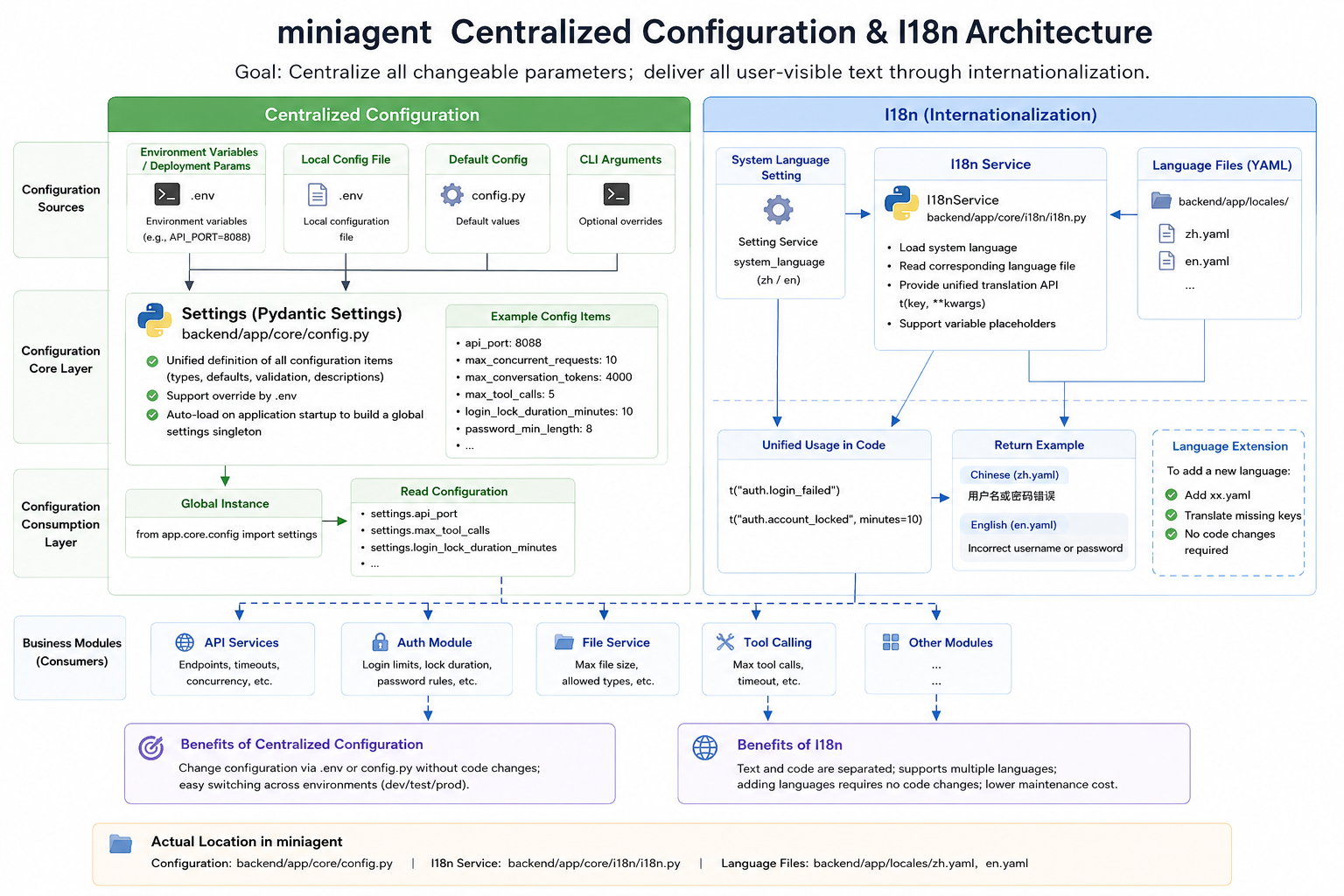
Centralized Configuration
In miniagent’s backend/app/core/config.py, configuration is uniformly defined using Pydantic Settings (a Pydantic configuration management component):
class Settings(BaseSettings):

    api_port: int = Field(
        default=8088,
        description="API port"
    )

    max_concurrent_requests: int = Field(
        default=10,
        description="Maximum concurrency"
    )

    max_conversation_tokens: int = Field(
        default=4000,
        description="Maximum number of tokens in a single conversation"
    )

    max_tool_calls: int = Field(
        default=5,
        description="Maximum number of tool calls"
    )
Along with the configuration:
model_config = SettingsConfigDict(
    env_file=".env",
    env_file_encoding="utf-8",
    case_sensitive=False,
    extra="ignore"
)
This way, the .env environment configuration file can override default values, and business modules only need to consume the unified settings.
Security rules work the same way:
password_min_length: int = Field(default=8, ge=1)

login_max_failed_attempts: int = Field(
    default=5,
    ge=1
)

login_lock_duration_minutes: int = Field(
    default=10,
    ge=1
)
Especially login_lock_duration_minutes — the name directly includes the unit “minutes,” eliminating the ambiguity of what 10 represents.
I18n Infrastructure
miniagent’s backend/app/core/i18n/i18n.py reads the system language and loads the corresponding YAML (YAML Ain’t Markup Language, a commonly used configuration data format) language file:
self._language = (
    await self._setting_service.get_system_language()
)

locale_file = Path(
    f"app/locales/{self._language}.yaml"
)

if locale_file.exists():
    with open(locale_file, "r", encoding="utf-8") as f:
        translations = yaml.safe_load(f) or {}
Then through the unified:
t("auth.login_failed")
It retrieves user-facing text, rather than letting each business module decide whether to use Chinese or English.
miniagent’s current backend language resource directory contains:
backend/app/locales/
├── zh.yaml
└── en.yaml
The actual Chinese resources already show:
common:
  success: 操作成功
  failed: 操作失败

auth:
  login_failed: 用户名或密码错误
  unauthorized: 未授权,请先登录
  token_invalid: Token 无效或已过期

  account_locked: >
    账户因连续登录失败已锁定,
    请在 {minutes} 分钟后重试,
    或联系管理员解锁。
Business code is responsible for providing data like minutes, while language resources are responsible for determining the final expression.
Therefore, miniagent’s overall approach can be distilled into two pathways:
Environment Variables
   ↓
Settings
   ↓
Business Code
System Language
   ↓
I18n
   ↓
zh.yaml / en.yaml
   ↓
t("xxx.xxx")
   ↓
Business Code
Both mechanisms address the same core problem:
Separate data that is prone to change from business logic that is relatively stable.
6. Conclusion: Code Is Responsible for Doing Things, Not for “Casually Deciding Rules”
The real danger of AI programming isn’t necessarily that it writes incorrect code.
The more common scenario is the opposite:
Every small snippet of code works, but the entire project becomes increasingly difficult to maintain.
timeout = 30
Might not be wrong.
max_retries = 3
Also might not be wrong.
raise ValueError("User does not exist")
Might even fully meet the current requirements.
What should really be asked is:
Why should this value appear here?
Good architecture defines the rules upfront:
Runtime Parameters  → Configuration
User-Facing Text    → I18n
Domain States       → Constants / Enumerations
Sensitive Info      → Environment Variables
Business Code       → Consumes the Above Definitions
Like miniagent, establishing Settings, .env, constants, and I18n infrastructure in advance is essentially drawing construction boundaries for AI.
It’s not about restricting AI from writing code, but about restricting AI from casually creating new rules.
Ultimately, what we want isn’t “AI writes faster,” but:
The faster AI writes, the more organized the project remains.
Open Source Code
🪐 Best of luck 🪐