When AI writes business code, it has a very typical tendency:
async def get_user(user_id: int):
    return await user_db.get_by_id(user_id)
Functionally correct. But if every read in the project becomes:
Read user → Database
Read permissions → Database
Read model → Database
Read Agent → Database
Read knowledge base → Database
Read config → Database
The system soon enters a state where:
Every function is correct, yet the overall architecture grows increasingly inefficient.
The problem is not merely “whether there is a cache”, but:
The AI never first asks: what I want to reuse — a “value”, or an “already-built runtime object”?
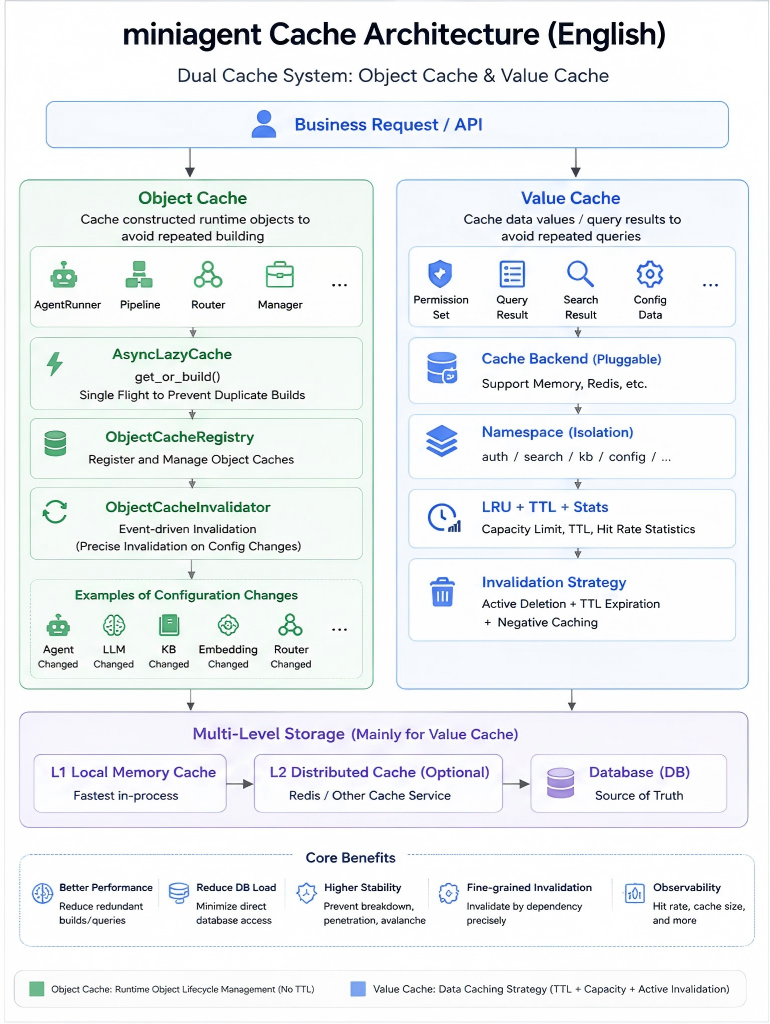
This is exactly what’s most worth borrowing from miniagent’s current caching architecture.
It doesn’t just build one cache — it explicitly splits into two categories:
Object Cache
Object caching

Value Cache
Value caching
These two solve fundamentally different problems.
📌 Technology Card
Cache
Temporarily stores content that is expensive to obtain and may be reused, in order to reduce repeated construction, repeated computation, or repeated access to the underlying storage.
Object Cache
Caches runtime objects that have already been built, such as:
AgentRunner, Pipeline, Router, Manager.
It solves:
Don’t repeatedly create expensive objects.
Value Cache
Caches plain data, such as:
permission sets, query results, JSON, strings, computed results.
It solves:
Don’t repeatedly query and recompute.
Multi-Level Storage
Based on speed, capacity, cost, and durability, places data at different tiers, for example:
L1 local memory → L2 Redis → Database.
Here:
L1 (Level 1) is usually process memory;
L2 (Level 2) is usually a shared cache like Redis;
Database serves as the ultimate authoritative data source.
💡 An Intuitive Way to Understand It: A Cache Is Not Just a “Warehouse”, but Also an “Assembled Machine”
Imagine a software system as a factory, and the database as the raw-materials warehouse.
If every time an employee needs a power drill, they run to the warehouse:
Pick up parts
↓
Assemble the motor
↓
Attach the drill bit
↓
Test it
↓
Use it
That’s clearly wasteful. The more sensible way is:
First time:
Warehouse → Assemble the drill → Use it

From then on:
Just grab the ready-made drill → Use it
This is:
Object caching.
Another case:
The employee just wants to check:
How much inventory is left today?
First trip to the warehouse confirms:
Stock = 128
If others ask the same question shortly after, there’s no need for everyone to re-inventory the warehouse.
You can just note it down:
Stock cache = 128
This is:
Value caching.
So although the two caches share a similar name, they are fundamentally different:
Object cache
→ caches "already-assembled things"

Value cache
→ caches "already-looked-up data"
This is exactly miniagent’s dual-track caching philosophy.
Why Is “Just Add Redis” Not Enough?
Many AIs, when faced with caching problems, swing to another extreme:
“We can add Redis.”
Redis is indeed widely used, but it can’t solve every caching problem.
For example, in miniagent:
AgentRunner
SmartRouter
WebSearchPipeline
KBRetrievalPipeline
VectorStoreManager
These are not plain JSON. Internally they may hold:
LLM Client
Tool instances
Repository references
asyncio.Lock
Database objects
Runtime state
Pipeline objects
Such objects usually:
Cannot be simply serialized
Cannot be directly reused across processes
Depend on current-process resources
So they are better suited to:
Process-Local Object Cache
rather than:
Redis.set("agent_runner", ...)
So the first question the caching architecture should answer is not:
Should we use Redis?
but:
What exactly am I caching?
1. miniagent’s Dual-Track Cache Architecture
Currently miniagent explicitly maintains two separate cache-management systems inside ServiceContainer:
self.cache_registry = ObjectCacheRegistry()

self.object_cache_invalidator = ObjectCacheInvalidator(
    self.cache_registry
)

from app.infra.cache.store_registry import (
    cache_registry as value_cache_registry
)

self.value_cache_registry = value_cache_registry
1. Object Cache: Solving “Don’t Repeatedly Build”
What is the Object Cache suited for?
Typical scenarios:
AgentRunner
WebSearchPipeline
SQLAgent
SmartRouter
KBRetrievalPipeline
VectorStoreManager
The construction of these Runtime Objects may involve:
Read database config
↓
Create LLM Client
↓
Load tools
↓
Assemble Pipeline
↓
Bind Repository
↓
Establish Runtime
↓
Complete initialization
If every request does this from scratch:
Request
↓
build()
↓
use()
↓
destroy
Then a lot of CPU, I/O, and initialization cost is wasted on repeated construction.
So miniagent’s approach is:
First use
↓
No cache
↓
Build the object
↓
Store it in the Object Cache
↓
Reuse it directly from then on
The core of the Object Cache: AsyncLazyCache
miniagent’s object cache core lives at:
app/runtime/cache/lazy_cache.py
Where:
AsyncLazyCache[K, V]
provides:
get_or_build()
The semantics are:
Return it if it exists; otherwise build it.
Core logic:
async def get_or_build(self, key, *args, **kwargs):

    if key in self._store:
        return self._store[key]

    ...

    value = await self._builder(
        key,
        *args,
        **kwargs
    )

    self._store[key] = value

    return value
The flow can be understood as:
The Object Cache Must Handle “Build Breakdown”
Suppose two requests simultaneously need:
AgentRunner(agent_id=10)
and the object hasn’t been created yet.
If you only do:
if key not in cache:
    cache[key] = await build()
You may end up with:
Request A → build
Request B → build
Request C → build
The same expensive object gets created three times.
This is essentially a case of:
Cache Breakdown
except here what’s being broken through is not the database, but:
the expensive object-construction process.
miniagent’s AsyncLazyCache uses a per-key:
asyncio.Lock()
and double-checked locking:
async with self._locks[key]:

    if key in self._store:
        return self._store[key]

    value = await self._builder(...)
So:
Builds the object"] E -->|Waits| G["Request B / C
Waiting"] F --> H[Write to cache] H --> I["Request A
Returns object"] H --> J["Request B / C
Directly reuse cached object"] G --> J
Here:
Single Flight
means:
For the same key, only one task at a time is allowed to be responsible for loading or building.
This is a very important design in miniagent’s object cache.
Why Doesn’t the Object Cache Usually Rely on TTL?
This is where object and value caches clearly diverge.
For example:
AgentRunner
doesn’t become invalid just because:
1 hour is up
What typically invalidates it is:
Agent config changed
LLM changed
Tool changed
KB changed
Embedding changed
Router config changed
In other words:
An object’s validity mainly depends on “whether its dependency config has changed”.
So it’s better suited to:
Event-Driven Invalidation
rather than:
TTL (Time To Live)
How Does miniagent Invalidate Object Caches?
miniagent specifically designed:
CacheInvalidationService
Located at:
app/runtime/cache/invalidation.py
For example, when an Agent config changes:
def on_agent_changed(self, agent_id):

    if agent_id:
        self.registry.invalidate(
            CacheType.AGENT_RUNNER,
            agent_id
        )
So:
Agent Changed
     ↓
AgentRunner is now stale
     ↓
Invalidate
     ↓
Next call
     ↓
Rebuild
This is the classic:
Config-driven runtime rebuild.
Object-cache invalidation is really “dependency-graph governance”
For example, an LLM config change.
It may affect not only:
LLM Runtime
but also:
WebSearchPipeline
SQLAgent
AgentRunner
KBRetrievalPipeline
So miniagent uniformly does:
def on_llm_changed(self):

    self.registry.invalidate_all(
        CacheType.WEB_SEARCH_PIPELINE
    )

    self.registry.invalidate_all(
        CacheType.SQL_AGENT
    )

    self.registry.invalidate_all(
        CacheType.AGENT_RUNNER
    )

    self.registry.invalidate_all(
        CacheType.KB_RETRIEVAL_PIPELINE
    )
Essentially:
cache.clear()
Because it knows:
Which objects depend on which configs.
2. Value Cache: Solving “Don’t Repeatedly Query Data”
The value cache is the one we’re most familiar with.
It caches:
Permission Set
Query Result
...
Its core goal is:
Avoid repeated database queries or repeated computation.
The Value Cache Uses Cache-Aside
A typical value-cache flow:
This pattern is usually called:
Cache-Aside Pattern
The application itself controls:
Read Cache first
↓
On miss, read Database
↓
Then write Cache
miniagent’s Value Cache Infrastructure
It lives at:
app/infra/cache/
├── factory.py
├── memory.py
└── store_registry.py
Created uniformly through:
create_cache_backend(...)
For example:
create_cache_backend(
    namespace="auth",
    backend_type="memory",
)
Currently it supports:
MemoryCacheStore
While reserving an interface for the future:
Redis
This means business code depends on:
the caching capability
rather than:
a specific caching product.
The Value Cache Needs LRU
The easiest way for a value cache to run out of control is:
cache[key] = value
and then never delete anything.
So:
100
1000
10000
100000
...
keeps growing.
So miniagent’s MemoryCacheStore uses:
LRU (Least Recently Used)
self._cache = LRUCache(
    maxsize=max_size
)
When the cache is full:
The least-recently-used data is evicted first.
The Value Cache Needs TTL
The value cache also faces:
Data can go stale.
For example, user permissions.
The database has been updated, but the cache still holds the old value.
So miniagent provides:
mset_with_ttl()
mget_ttl()
Through:
TTL (Time To Live)
it limits the maximum usable time of the data.
For example:
TTL = 3600 seconds
After expiration:
Cache Miss
↓
Re-query the database
↓
Re-cache
This is very reasonable for ordinary data caching.
miniagent’s Permission Cache Is a Typical Value Cache
In AuthPermission:
cached = self._cache.mget_ttl(
    [self._cache_key(user_id)]
)[0]

if cached is not None:
    return self._decode(cached)

return await self._load_permissions(user_id)
That is:
This avoids:
Re-querying the RBAC permission chain on every API request.
A Value Cache Needs Not Only TTL, but Also Active Invalidation
TTL alone isn’t enough.
For example, an admin just revoked a user’s permissions.
If:
TTL = 3600 seconds
The old permissions could theoretically persist for nearly an hour.
So you also need:
Invalidate Cache
When permissions change:
Database Update
      ↓
Invalidate Value Cache
      ↓
Next request
      ↓
Cache Miss
      ↓
Reload latest permissions
So a complete value cache must consider:
Read
Write
TTL
Invalidate
Capacity
Stats
rather than only:
get / set
The Value Cache Also Faces Cache Penetration
Suppose someone repeatedly requests:
user_id = 999999999
The cache doesn’t have it:
MISS
The database doesn’t have it either.
Next time:
MISS
↓
Database
Still nothing.
This is:
Cache Penetration
That is:
Querying data that doesn’t exist in the first place, causing requests to keep passing through the cache and hitting the database.
How to Handle Cache Penetration?
One simple approach:
Negative Cache (empty-value caching)
For example:
user:999999999 = NOT_FOUND
TTL = 60 seconds
Next time:
Cache Hit
↓
NOT_FOUND
↓
Return directly
The database doesn’t need to be queried again.
The TTL for empty-value caching should usually be shorter.
For example:
Normal value: 3600 seconds
Empty value: 60 seconds
To avoid blocking newly created data for too long with the stale empty value.
The Value Cache Also Faces Hot-Key Breakdown
Suppose:
system_config
is a high-frequency hot key.
Normally:
1000 Requests
      ↓
Cache
Suddenly the TTL expires:
Cache Expired
So:
Request A ─┐
Request B ─┤
Request C ─┤
...        ├──→ Database
Request N ─┘
This is:
Cache Breakdown
The solution can still use:
Single Flight / Per-Key Lock
That is:
Lots of misses
↓
Only one request with the same key is allowed to go back to source
↓
Other requests wait
↓
Cache is rebuilt
↓
All return uniformly
miniagent’s Object Cache already natively embodies this Single-Flight idea.
In the future, if certain value caches become high-concurrency hot spots, the same approach can be reused.
Cache Avalanche Is Also More Typical of Value Caches
If the AI uniformly sets for all caches:
ttl = 3600
And a lot of data is written around the same time:
Written at 11:00
↓
Expires en masse at 12:00
You may get:
Cache Avalanche
That is:
A large number of caches expire at once, and a flood of requests instantly hits the database.
Mitigation methods include:
TTL Jitter
Random TTL variation

Multi-Level Cache
Multi-tier caching

Rate Limiting
Throttling
3. Why Is the Object Cache Unsuitable for Redis, While the Value Cache Is a Great Fit?
Look at the simplest comparison.
AgentRunner
May contain:
LLM Client
Tool
asyncio.Lock
Repository
Pipeline
Runtime State
Characteristics:
Complex
Not directly serializable
Depends on the current process
Suited to:
Local Memory
Permission Set
For example:
[
  "system:user:list",
  "system:user:create"
]
Characteristics:
Simple
Serializable
Shareable across processes
Suited to:
Memory
↓
Redis
So when miniagent scales horizontally in the future, the more reasonable approach is:
Object Cache
→ Each process still keeps its own Runtime

Value Cache
→ Can evolve into a shared Redis cache
That is the design that respects the nature of the objects.
4. miniagent Also Keeps the Two Caches’ Registries Separate
Object Cache Registry
Responsible for:
Which Runtime Caches exist?
Which Runtime Object to invalidate?
Invalidate all?
Invalidate by condition?
Inspect the Runtime Cache status?
Corresponds to:
CacheRegistry
Supports:
invalidate
invalidate_all
invalidate_where
stats
list_names
Value Cache Registry
Responsible for:
Which namespaces exist?
What the underlying backend is?
How many keys right now?
What's the hit rate?
Which keys to delete?
Which namespace to clear?
Corresponds to:
CacheStoreRegistry
The responsibilities of these two registries are in fact very clear:
Object Registry
→ Runtime lifecycle governance

Value Registry
→ Key-Value data governance
5. Caches Must Be Observable
Another thing AI easily overlooks when adding caches:
Is the cache actually working?
You should at least know:
Hits
Misses
Hit Rate
Current Size
TTL Expirations
miniagent’s MemoryCacheStore already maintains:
self._hits
self._misses
self._ttl_expirations
And through:
get_stats()
returns:
current_size
hits
misses
hit_rate
ttl_expirations
So a cache is not:
“It should feel a bit faster now.”
It should be able to answer:
How much was actually hit?
Scene 1: Everything Queries the Database Directly
return await repository.get(id)
Problem:
The AI never judged whether the data is high-frequency, expensive, or already cached.
Scene 2: A Complex Runtime Gets Re-Created Every Time
runner = await build_agent_runner(agent_id)
Every request rebuilds.
Problem:
The AI didn’t realize this isn’t an ordinary object, but a reusable Runtime.
Scene 3: All Caches Become One dict
cache = {}
Then:
AgentRunner
Permission
Search Result
Config
all get stuffed in.
Problem:
Object lifecycles and data lifecycles are completely different, yet get conflated.
Scene 4: See a Cache, Reach for Redis
"Just add Redis."
Problem:
Runtime Objects are simply not suitable for cross-process serialization.
Scene 5: Cache but Never Invalidate
cache[key] = value
And then never touch it again.
Result:
The database changed; the cache is still alive.
Scene 6: Mechanical TTL on the Object Cache Too
For example:
AgentRunner TTL = 1h
Problem:
The Agent config didn’t change, yet it gets rebuilt for nothing.
Or:
The Agent config changed long ago, but the TTL hasn’t expired yet.
The correct approach should be:
Config change
→ Precise invalidation
Scene 7: All Value Caches Are Treated the Same
TTL = 3600
max_size = 1000
Copied into every scenario.
But in reality:
Permissions
Search results
Config
Temporary computation results
have completely different access patterns.
The caching strategy shouldn’t be identical either.
2. Establish Clear Caching Rules for the AI
You can add the following to your Project Rules.
## Cache Architecture

miniagent uses two different caching systems:
1. Object Cache
2. Value Cache

Never conflate their responsibilities.

### Object Cache

The Object Cache stores expensive runtime objects, such as:
- AgentRunner
- Pipelines
- Routers
- Vector store managers
- Runtime components

Rules:
- Use AsyncLazyCache.
- Use lazy construction.
- Use the single-flight pattern to prevent duplicate concurrent construction.
- Keep runtime objects process-local.
- Do not serialize runtime objects into Redis.
- Prefer event-driven invalidation.
- When a dependency config changes, invalidate the affected runtime objects.

### Value Cache

The Value Cache stores serializable values, such as:
- Permission sets
- Query results
- Computed results
- Simple data objects

Rules:
- Use the shared cache backend abstraction.
- Use namespaces to isolate different domains.
- Apply capacity limits, e.g. LRU (Least Recently Used).
- Use TTL (Time To Live) where data may go stale.
- Invalidate relevant keys after important writes.
- Consider negative caching for missing data.
- Protect hot keys from cache breakdown when necessary.
- A distributed backend (e.g. Redis) should belong here.

### Storage Hierarchy

The Value Cache may evolve into:

L1 Memory
→ L2 Redis
→ Database

The Object Cache is an independent runtime-lifecycle system,
and should not be treated as another L1/L2 value-cache layer.
It can be summarized as:
Complex runtime objects go through the Object Cache; ordinary data goes through the Value Cache.
Invalidate the object cache on config changes; invalidate the value cache via TTL and data changes.
Just because both are called “Cache” doesn’t mean the AI should handle them with the same logic.
3. Putting It into Prompts: Don’t Just Say “Add a Cache”
Bad prompt:
Add a cache to this feature.
The AI has no idea which kind it should be.
A better prompt:
First determine whether this scenario calls for the Object Cache or the Value Cache.

If you're caching a Runtime Object that is expensive to build:

1. Reuse the existing AsyncLazyCache;
2. Use get_or_build;
3. Preserve Single Flight;
4. Don't introduce TTL as the primary invalidation method;
5. Clearly state which configs it depends on;
6. On config changes, precisely invalidate via ObjectCacheInvalidator.

If you're caching ordinary serializable data:

1. Reuse the existing Value Cache Backend;
2. Use an independent namespace;
3. Clearly state the key;
4. Clearly state max_size;
5. Clearly state the TTL;
6. Clearly state the invalidate path after data changes;
7. Determine whether cache penetration exists;
8. Determine whether a hot key carries breakdown risk;
9. Don't privately create dict/LRU caches inside business code.
This way, before doing anything, the AI first makes the single most important architectural decision:
Am I caching an object, or a value?
Summary
What caching and multi-level storage really need to correct is not only:
AI blindly querying the database.
It also includes another equally common problem:
AI blindly re-creating expensive objects.
So in miniagent, the more accurate caching philosophy is:
Object Cache
solves "don't repeatedly build"

Value Cache
solves "don't repeatedly query"
The object cache uses:
AsyncLazyCache
+
Lazy Build
+
Single Flight
+
Event Invalidation
to manage the Runtime Object lifecycle.
The value cache uses:
Cache Backend
+
Namespace
+
LRU
+
TTL
+
Invalidate
+
Stats
to reduce database and computation pressure.
And the Value Cache can naturally evolve in the future into:
L1 Memory
↓
L2 Redis
↓
Database
That is a complete and clear caching and multi-level storage architecture.
For AI programming, what should truly be written into the rules is not:
“Remember to use caching.”
but:
First determine whether you’re repeatedly “building objects” or repeatedly “querying data”; then use the corresponding cache system, rather than casually stuffing a dict into the business code.
Open Source Code
🪐 Good luck 🪐