In AI programming, there is one category of code that easily “grows and grows messier”:
if user.role != "admin":
    raise HTTPException(status_code=403)
Switch to another endpoint, and the AI writes:
if "user:delete" not in user.permissions:
    raise ForbiddenError()
Yet another endpoint:
if current_user.id != owner_id and not current_user.is_admin:
    raise HTTPException(status_code=403)
Each snippet looks defensible on its own. But once dozens of variations of these ifs appear across the project, the permission system has effectively gone out of control.
The mature solution is not “make the AI write its if-statements more carefully”, but to establish a unified:
Authentication + permission model + permission enforcement mechanism
The most common permission model here is RBAC (Role-Based Access Control).
📌 Technology Card
Authentication
Answers the question:
“Who are you?”
For example, verifying the login account, or whether a JWT token is valid.
Authorization
Answers the question:
“What are you allowed to do?”
For example, whether a user can delete an Agent, modify a knowledge base, or manage users.
RBAC / Role-Based Access Control
Instead of attaching a pile of permissions to each user directly, it establishes a unified grant relationship through:
User → Role → Permission
For example:
Zhang San
 ↓
System Administrator
 ↓
user:list
user:create
user:update
user:delete
Rather than checking separately in dozens of endpoints:
if username == "zhangsan":
    ...
or:
if role == "admin":
    ...
💡 An Intuitive Way to Understand It: Access Control Is Like a Company Badge System
Imagine a company where employees swipe their badge cards when entering the building.
The system first needs to determine:
Is this card genuine?
Has it expired?
Who does it belong to?
Is this employee still on staff?
That is:
Authentication
Once identity is confirmed, further checks continue as the employee enters different areas:
Can a regular employee enter the office area?
Yes.

Can a regular employee enter the server room?
No.

Can ops staff enter the server room?
Yes.

Can finance staff open the finance system?
Yes.
That is:
Authorization
If designed sensibly, the company doesn’t tape a note next to every door saying:
If Zhang San comes, open the door
If Li Si comes, open it too
If Wang Wu comes, don't open
If the boss comes, open everything
Because once there are many employees, that rule set immediately spirals out of control.
The more sensible approach is:
Employee
 ↓
Role
 ↓
Permission
 ↓
Resource
For example:
Zhang San → Ops staff → server:manage
Li Si → Finance staff → finance:view
Wang Wu → Regular employee → office:access
That is RBAC.
1. Why Does AI Botch Permission Systems So Easily?
Because AI is very good at solving the problem right in front of it.
You tell it:
Add a permission check to the delete-user endpoint.
It most easily generates:
if not current_user.is_admin:
    raise HTTPException(status_code=403)
Feature done.
But next time you ask it:
Add a permission check to the delete-Agent endpoint.
It may generate:
if "agent:delete" not in user.permissions:
    raise HTTPException(status_code=403)
Then ask it to protect the knowledge base:
if user.role not in ["admin", "manager"]:
    raise HTTPException(status_code=403)
Eventually the project may simultaneously contain:
is_admin
role == "admin"
role in [...]
permissions
permission_codes
user_type
is_super
six or seven different permission-checking approaches.
This is the classic case of:
Functionally correct, architecturally out of control.
2. Architectural Rules
1. First, Separate Authentication from Authorization
A unified auth system must begin with a very important boundary:
Authentication
Auth: who are you?
        ↓
Authorization
Auth: what can you do?
Don’t blend the two into one giant function. A clean architecture looks like:
Client Request
      ↓
Bearer Token
      ↓
JWT Verification
      ↓
Resolve User
      ↓
Check User Status
      ↓
Authenticated User ID
      ↓
Permission Resolution
      ↓
Permission Check
      ↓
Router
      ↓
Service
Where:
Bearer Token
is usually carried in the HTTP request header:
Authorization: Bearer xxxxx
And:
JWT (JSON Web Token)
is responsible for proving:
Who issued this token?
Has it been tampered with?
Has it expired?
Which user does it correspond to?
RBAC, meanwhile, is responsible for:
Which roles does this user hold?
Which permissions do those roles hold?
Which permission does the current endpoint require?
The two have completely different responsibilities.
2. JWT Issuance Must Have Exactly One Standard Implementation
Another common problem in AI projects is that token issuance logic gets implemented repeatedly.
For example:
payload = {
    "username": username,
    "exp": datetime.utcnow() + timedelta(hours=1)
}

token = jwt.encode(payload, SECRET)
Somewhere else:
payload = {
    "sub": user.id,
    "expire": ...
}
And a third place:
jwt.encode(
    {"user": username},
    key,
    algorithm="HS256"
)
Before long you end up with:
Different fields
Different expiration times
Different algorithms
Different ways of reading the signing key
Different verification logic
So you should explicitly require the AI to follow:
Token creation, parsing, and verification must go through the unified JWT component only.
In miniagent, this responsibility is centralized in:
app/core/security/jwt_auth.py
JWTAuth.create_token() uniformly generates the payload:
payload = {
    "sub": username,
    "exp": expire,
    "iat": datetime.now(timezone.utc),
    "type": token_type
}
Where:
sub: Subject, the token principal;exp: Expiration Time;iat: Issued At;type: the token type.
It then uniformly calls:
jwt.encode(
    payload,
    self.secret_key,
    algorithm=self.algorithm
)
to complete issuance.
This means miniagent never needs the Login Router, Admin Router, or User Router each to figure out JWT generation on their own.
3. Token Verification Must Also Be Centralized
Unifying issuance is not enough — verification must not be scattered either.
The wrong way is:
try:
    payload = jwt.decode(...)
except:
    ...
written separately in dozens of endpoints.
Because token verification involves at least:
Is the signature valid?
Has it expired?
Which algorithm is used?
What is the subject field?
How are exceptions handled?
In miniagent, JWTAuth.verify_token() uniformly calls:
payload = jwt.decode(
    token,
    self.secret_key,
    algorithms=[self.algorithm],
    options={
        "verify_exp": True,
        "verify_signature": True
    }
)
After verification passes, it uniformly reads:
username = payload.get("sub")
If the token is expired or invalid, a failure result is returned uniformly.
So the whole project only needs to acknowledge one fact:
JWTAuth
  ├─ create_token()
  └─ verify_token()
instead of:
Router A → decodes on its own
Router B → decodes on its own
Service C → decodes on its own
Middleware D → writes decode yet again
4. Successful Authentication Does Not Mean Having Permission
This is a point beginners easily confuse. A successful JWT verification only proves:
This request corresponds to a legitimate identity.
It does not prove:
This user can do anything.
For example, a regular user logs in successfully:
JWT ✅
But tries to delete another user:
user:delete ❌
So after authentication, the authorization phase still follows.
In miniagent, this part is handled centrally by:
AuthPermission
Its resolve_user_id() flow is:
Token
  ↓
JWT verify
  ↓
username
  ↓
Look up the user
  ↓
Check is_active
  ↓
user_id
If the token is invalid, the user doesn’t exist, or the account has been disabled, the request is uniformly rejected.
This design matters, because authentication must not trust the token alone.
For example:
User logged in yesterday
↓
Obtained a valid token
↓
Admin disabled the account today
↓
The old token has not yet expired
If the system only verified the JWT signature, that user could theoretically keep accessing the system.
miniagent additionally reads the user’s status from the database, so disabling an account takes real effect.
5. The Core of RBAC: Never Write Permission Checks Directly Against Users
The simplest RBAC relationship is:
User
 ↓
Role
 ↓
Permission
For example:
User: Alice
   ↓
Role: admin
   ↓
Permissions:
   user:list
   user:create
   user:update
   user:delete
Another user:
User: Bob
   ↓
Role: viewer
   ↓
Permissions:
   user:list
So the Router no longer cares about:
Is Alice an administrator?
What role does Bob have?
How many roles does Carol belong to?
The Router only cares about:
Which Permission does this endpoint require?
For example:
system:user:delete
And then lets the unified permission system answer:
Does the current user have this permission?
6. How Does miniagent Obtain User Permissions?
In miniagent’s AsyncMenuDatabase, user permissions are not hard-coded in Routers, but obtained through relationship queries:
User
 ↓
Role
 ↓
Menu / Permission
Corresponding to this relational query in the code:
select(Menu.name)
    .select_from(User)
    .join(User.roles)
    .join(Role.menus)
    .where(
        User.id == user_id,
        Menu.is_active.is_(True)
    )
Then converted into:
set(result.scalars().all())
that is, a permission set. This already forms the classic RBAC pattern:
User
  ↓
Role
  ↓
Resource Code
Business endpoints don’t need to know how the role table, the user-role mapping table, or the role-menu mapping table are actually queried.
7. Even Super Admins Must Not Lead to if is_admin Everywhere
Super administrators are another spot where permission systems easily get messy. The most dangerous approach is:
if user.username == "admin":
    return True
or:
if user.role == "superadmin":
    ...
scattered across dozens of business files.
miniagent instead uses the unified:
SUPER_PERMISSION
If the user belongs to the super role:
return {SUPER_PERMISSION}
Regular users get their actual permission set returned. In the end, all permission checks converge into:
if SUPER_PERMISSION in perms or required in perms:
    return
Otherwise access is denied.
This way the super-admin rule has exactly one authoritative implementation, instead of:
if is_super:
popping up all over the project.
8. Routers Should “Declare Permissions”, Not “Implement Permissions”
This is the single most important sentence in the whole design.
The wrong Router:
@router.delete("/users/{user_id}")
async def delete_user(
    user_id: int,
    request: Request
):
    token = request.headers.get("Authorization")
    username = jwt_auth.verify_token(token)
    user = await user_db.get_user(username)

    permissions = await menu_db.get_user_resource_codes(
        user.id
    )

    if (
        "system:user:delete" not in permissions
        and "*" not in permissions
    ):
        raise HTTPException(status_code=403)

    return await user_service.delete(user_id)
Here the Router is simultaneously doing:
Parse the header
Verify the JWT
Look up the user
Look up permissions
Check super admin
Enforce the permission check
Execute the business
The Router is no longer a Router.
The more reasonable version:
@router.delete("/users/{user_id}")
async def delete_user(
    user_id: int,
    current_user_id: int = Depends(
        Permission("system:user:delete")
    )
):
    return await user_service.delete(user_id)
Now the business layer expresses only:
Deleting a user requires
system:user:delete.
As for:
How is the token extracted?
How is the JWT verified?
How is the user looked up?
How are permissions queried?
How is caching handled?
How is a super admin determined?
How is the 403 raised?
All of that is the unified auth system’s responsibility.
9. The Permission Design in miniagent
AuthPermission.Permission in miniagent does exactly this.
The core flow is very clear:
async def __call__(
    self,
    request: Request,
    credentials: HTTPAuthorizationCredentials = Depends(
        _bearer_scheme
    ),
) -> int:

    auth = request.app.state.container.auth

    user_id = await auth.resolve_user_id(
        credentials.credentials
    )

    await auth.check(
        user_id,
        self._code
    )

    return user_id
That is:
Bearer Token
      ↓
resolve_user_id()
      ↓
JWT verification
      ↓
User identity
      ↓
check()
      ↓
Permission set
      ↓
required permission
      ↓
Allow / Deny
This logic is executed by the unified dependency, not implemented by each business Router itself.
10. Permission Queries Also Need Caching
After unifying authentication, a practical problem appears.
If every API request executes:
JWT verification
↓
Query User
↓
Query Role
↓
Query Permission
this adds database load under high concurrency, so the permission set is a great fit for caching.
In miniagent:
CACHE_TTL_SECONDS = 3600.0
that is, one hour of caching by default.
The lookup logic is:
In the code:
cached = self._cache.mget_ttl(
    [self._cache_key(user_id)]
)[0]

if cached is not None:
    return self._decode(cached)

return await self._load_permissions(user_id)
When permissions change, the cache is proactively invalidated via:
invalidate(user_id)
So unified authentication not only makes the code cleaner, it also leaves a unified entry point for performance optimization.
11. Authentication, Authorization, and Business Should Form Clear Boundaries
The overall architecture can ultimately be understood as:
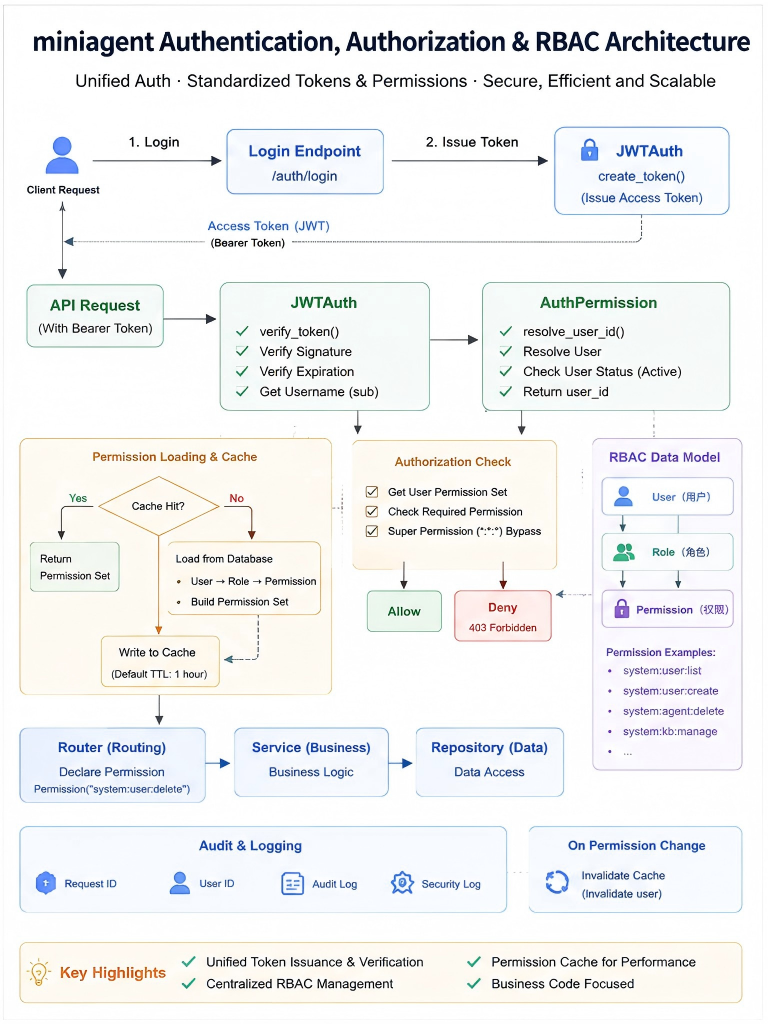
miniagent’s JWTAuth handles unified token issuance and verification.
miniagent’s AuthPermission handles resolving the user from the token, checking user status, loading and caching permissions, and performing the final permission decision.
miniagent’s permission data is read through the User → Role → Menu relationships; the super role is uniformly mapped to SUPER_PERMISSION, rather than repeatedly checking admin status in business code.
In short:
Token issuance
Signature verification
Expiration check"] C --> D["AuthPermission
User resolution
User status
Permission loading
Permission caching
Permission check"] D --> E[Permission] E --> F[Router] F --> G[Service] G --> H[Repository]
The biggest value here is not saving a few lines of code.
It is the crispness of the boundaries:
JWTAuth
owns the "token"

AuthPermission
owns "authentication + authorization"

Permission
owns "declaring endpoint permissions"

Router
owns "request orchestration"

Service
owns "business logic"
As long as the AI respects these boundaries, it won’t easily scatter permission logic around.
3. What Are the Benefits of Unified Authentication?
1. Security Rules Have Exactly One Implementation
Suppose the JWT algorithm changes later.
If the project has 30 copies of:
jwt.decode(...)
you have to review 30 places.
If everything is centralized in:
JWTAuth.verify_token()
you change exactly one place.
2. Permission Logic Is Genuinely Consistent
All endpoints uniformly pass through:
resolve_user_id()
↓
get_permissions()
↓
check()
So:
How disabled users are handled
How super admins are handled
How missing permissions are handled
How 403 is returned
How caching is handled
is consistent across the board.
3. Routers Become Easy to Understand
Seeing:
Permission("system:user:delete")
a developer immediately knows:
This endpoint requires the delete-user permission.
No need to read 20 lines of ifs to figure out who can actually access it.
4. Permissions Can Be Centrally Audited
Once all authorization flows through the unified:
AuthPermission.check()
adding any of the following later:
Permission-denied logging
Security auditing
Access statistics
Anomalous behavior analysis
only requires touching one entry point.
5. It Suits AI Programming Better
What AI fears most is:
The project has five ways of doing it,
but nobody tells it which one to use.
Unified authentication effectively tells the AI:
Do not design your own permission system.

Need a token:
go to JWTAuth.

Need the current user:
go to CurrentUser.

Need permissions:
go to Permission.

Need a permission check:
go to AuthPermission.
The AI’s freedom is constrained to exactly the right places.
4. Write the Architecture Rules Down Clearly for the AI
You can add the following directly to your project-level AI Rules:
## Authentication and Authorization

Authentication and permission control must be implemented in a unified way.

### JWT

- It is forbidden to create or verify JWTs inside Routers, Services, or Repositories;
- All JWT issuance and verification must reuse the project's existing JWTAuth;
- It is forbidden to design another payload, algorithm, or expiration policy.

### Permissions

- The permission model uses RBAC;
- Hard-coded role checks in business code are forbidden;
- Scattered permission if-checks are forbidden;
- Routers declare permissions via the existing Permission / AuthPermission;
- Services must not re-implement endpoint-level permission checks;
- The super-admin bypass rule must be implemented centrally.

### Responsibilities

JWTAuth:
owns the Token.

AuthPermission:
owns authentication, permission loading, caching, and permission checks.

Router:
only declares which permission is required.

Service:
only handles business logic.
Putting It into Prompts: Don’t Ask the AI to “Add Some Auth”
Bad prompt:
Add admin permissions to this endpoint.
The problem with this sentence is:
the AI has no idea how “admin permissions” should actually be implemented in your project.
So it will very likely write:
if user.role != "admin":
A more sensible prompt:
Please add permission control to this endpoint.

It must follow the current project's unified auth architecture:

1. Do not manually parse the Authorization Header in the Router;
2. Do not call jwt.decode directly;
3. Do not check role == "admin" in the Router or Service;
4. Do not add scattered permission if-checks;
5. Reuse the existing AuthPermission / Permission;
6. The Router only declares the required permission;
7. Continue using the existing JWTAuth for JWT;
8. Continue using the existing SUPER_PERMISSION for super admins;
9. Do not change the existing RBAC data model;
10. Do not re-implement the existing permission caching logic.
With constraints like these, the AI no longer needs to “design a permission system”.
It only needs to:
Plug into the existing permission system.
When Developing New Features, Ask the AI One Question First
From now on, when asking the AI to add an endpoint, you can first require:
Before modifying any code, please check:

1. Whether the project already has a unified JWT implementation;
2. Whether the project already has an authentication dependency;
3. Whether the project already has a permission model;
4. Whether the project already has a way to declare permissions;
5. Which existing mechanism the current endpoint should reuse.

If an existing mechanism exists, re-implementation is forbidden.
This sentence is crucial:
If an existing mechanism exists, re-implementation is forbidden.
Because one of the biggest hidden risks of AI programming is:
The old code already solved it once,
and the AI very diligently solves it a second time.
Summary
The core of unified authentication and RBAC is not:
writing more security checks.
Quite the opposite — it demands:
Don’t let security checks scatter across business code.
A healthy permission architecture should be crystal clear:
JWT
handles identity credentials

Authentication
answers "who are you"

RBAC
answers "which permissions you hold"

Authorization
answers "may you do this"

Router
declares which permission is required

Service
executes the actual business
And in the age of AI programming, one more hard rule should be added:
The AI may call the permission system, but it is not allowed to reinvent the permission system.
Don’t let the project end up as:
if user.role == "admin":
if user.is_super:
if permission in permissions:
if username == "root":
scattered everywhere. What we really want to see is:
Permission("system:user:delete")
with all the complex authentication and authorization machinery working behind a unified architecture.
That is RBAC’s greatest value for AI programming:
Turning “who can do what” into a unified rule set, instead of letting the AI guess it anew in every business file.
Open Source Code
🪐 Good luck 🪐