AI is very good at writing code. But without clear architectural boundaries, it can easily develop one problem:
Wherever it’s convenient to write code, that’s where the code gets written.
Business rules that should belong to the backend might end up stuffed into Vue pages. API calls that should be uniformly encapsulated might scatter across various components. The frontend might even “invent” its own data structures inconsistent with the backend, based on page requirements.
The code might run, but the project gradually loses its boundaries.
And frontend-backend separation is the first important boundary to draw for AI.
📌 Technical Profile
Frontend-Backend Separation
The frontend is primarily responsible for page rendering, user interaction, and client-side state, while the backend handles business logic, permissions, security, and data storage.
The two sides do not directly intrude into each other’s internals, but communicate through stable APIs (i.e., Application Programming Interfaces).
💡 One-Sentence Understanding
You can think of a software system as a restaurant.
- The frontend is the dining hall: responsible for menu display, reception, taking orders, and presenting results to customers;
- The backend is the kitchen: responsible for ingredients, cooking, inventory, and actual business processing;
- The API is the order ticket.
A waiter can deliver an order to the kitchen, but shouldn’t run in and start cooking. A chef is responsible for cooking, but shouldn’t run out to the dining hall and modify the menu page.
Therefore:
The essence of frontend-backend separation is not about putting code into two folders, but about clearly defining responsibility boundaries.
This is especially important for AI programming.
Because human programmers usually know:
Even though this code works when written here, it shouldn’t be written here.
AI, without such architectural rules, tends to prioritize:
The approach that completes the current task the fastest.
Over time, this easily leads to duplicate interfaces, business logic sinking into the frontend, scattered permission checks, inconsistent data structures, and other problems.
I. Architecture Standards: First Tell AI Who Is Responsible for What
To make AI truly follow frontend-backend separation, you can’t just tell it one sentence:
This project adopts a frontend-backend separation architecture.
This statement is too abstract. A more effective approach is to turn it into rules that AI can directly execute.
Below is a diagram illustrating the front-end and back-end separation architecture of miniagent:
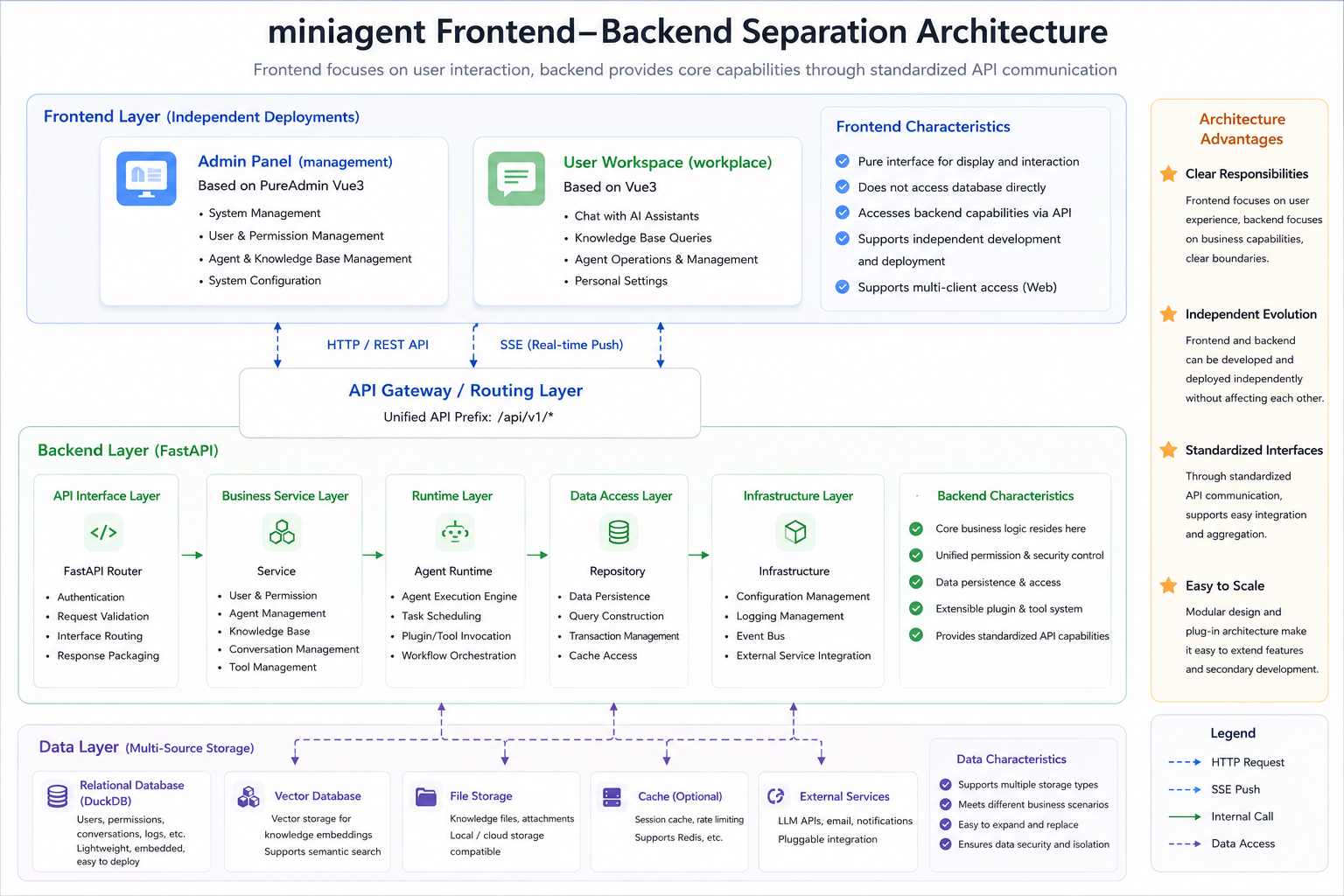
Furthermore, these can be solidified into the following rules.
Rule 1: The Frontend Must Not Directly Access the Database
The database belongs to the backend.
When the frontend needs data, it can only obtain it through APIs.
The frontend doesn’t need to know whether the database (e.g., SQLite, MySQL, PostgreSQL) has been replaced.
Rule 2: Core Business Rules Are Authoritative on the Backend
For example:
Is the user allowed to delete?
This check must not only exist on the frontend:
if (user.role !== "admin") {
  disableDeleteButton()
}
The frontend can hide the button to improve user experience.
But the real permission check must happen on the backend, otherwise users can completely bypass the page and call the API directly.
Therefore:
The frontend is responsible for experience, the backend is responsible for authority.
Rule 3: The Frontend Should Not “Invent” Its Own APIs
Suppose AI is developing:
Delete a user.
Without rules, it might directly write in a component:
axios.delete(`/user/delete?id=${id}`)
Another AI on the backend might implement it as:
DELETE /api/v1/admin/users/{id}
Both pieces of code look fine individually.
But together, they don’t work.
So the rule should be:
Before adding new frontend features, first check existing APIs;
Before adding new backend APIs, first check the existing interface specifications.
Rule 4: API Calls Must Be Uniformly Encapsulated
Don’t let pages be littered with:
axios.get(...)
axios.post(...)
fetch(...)
Instead, form:
Vue Component
      ↓
API Module
      ↓
HTTP Client
      ↓
Backend API
This way, logic such as Token management, error handling, timeouts, Token refresh, and logging can all be handled uniformly.
Using a mature open-source frontend framework is a shortcut: it has already uniformly encapsulated common methods for interacting with the backend.
Rule 5: The Backend Must Not In Turn Depend on Specific Pages
What the backend provides is:
Users
Knowledge Base
Agent
Sessions
Tools
Permissions
Not:
"Data for the user management page"
"Data for the card on the right side of the homepage"
"Data for a certain button"
Pages change easily, but capabilities should be kept stable as much as possible.
Therefore, the backend should provide business APIs, rather than designing business logic around a specific Vue page.
II. What Are the Benefits of Doing This?
Frontend-backend separation sounds like a technical “division of labor,” but its benefits are actually very intuitive.
Especially in AI programming, its greatest value is not “looking more standardized,” but making the entire project less likely to get messier as it grows.
1. AI Can More Easily Know Where Code Should Be Written
Without clear boundaries, when AI receives a requirement, it easily writes wherever is convenient.
For example, adding a “whether the user can delete” check.
Without rules, AI might write the check directly into the frontend page. With frontend-backend separation, responsibilities become clear:
Frontend:
Whether to show the delete button

Backend:
Whether this user actually has delete permission
AI doesn’t need to guess each time, and the project becomes more stable.
2. Modifying the Frontend Won’t Easily Break the Backend Too
A system’s interface changes frequently. Today the button is on the left, tomorrow it moves to the right. Today it’s a table, tomorrow it becomes cards.
If business logic is all mixed into pages, every interface change might accidentally damage core functionality.
After frontend-backend separation:
How the page displays -> Decided by the frontend
How the business actually executes -> Decided by the backend
As long as the API doesn’t change, both sides can be modified relatively independently.
3. Multiple Frontends Can Reuse the Same Backend
This is also a very practical aspect of frontend-backend separation.
The same backend can simultaneously serve:
Admin dashboard
Regular user website
Mobile App
Mini-program
Other systems
Because they all call the same set of APIs.
In other words, the backend provides “capabilities,” not a specific page.
4. AI Is Less Likely to Reinvent the Wheel
Without unified interface standards, AI easily writes a new set for every feature:
Request methods
Error handling
Permission checks
Response formats
API addresses
Over time, a project might end up with many different approaches.
With frontend-backend separation combined with a unified API Client, AI can more easily reuse existing patterns.
For example:
Page -> Existing API Module -> Unified HTTP Client -> Backend
This way, new features usually only need to extend the existing structure, rather than reinventing a new solution.
5. Easier to Troubleshoot When Problems Arise
If an error occurs after a user clicks a button, you can follow a clear chain to investigate:
Did the page send a request? -> Did the API receive it? -> Did the business logic execute? -> Did the database return correctly?
It’s easier to determine which layer the problem is in.
The same applies to AI. You can directly tell it:
“The frontend request is normal, the backend returns 500, please only check the backend.”
AI’s search scope will be significantly narrowed.
6. Better Suited for Collaborative Development with Multiple People and AI
The development approach that will become increasingly common in the future is likely not one programmer writing from start to finish, but:
Human developer
Technical lead
Frontend developer
Backend developer
AI programming assistant
AI Agent
All participating in one project together.
At this point, the biggest fear is not that everyone can’t write code, but:
Everyone writes code according to their own understanding.
Clear frontend-backend boundaries are like pre-marked construction zones. Who is responsible for what, where the interfaces are, how data is exchanged — all are relatively clear.
Therefore:
Frontend-backend separation is not just dividing code, it’s dividing responsibility.
And the clearer the responsibility, the easier it is for AI to participate stably in large-scale project development.
III. Prompt Implementation: Truly Telling AI About Architectural Boundaries
Therefore, we can write the frontend-backend separation rules into project-level rules, for example:
## Frontend/Backend Boundaries

This project strictly follows the frontend-backend separation principle.

Frontend responsibilities:
- UI rendering
- User interaction
- Client-side state management
- Form validation (to improve user experience)
- Calling backend APIs

Backend responsibilities:
- Business logic
- Authorization
- Security validation
- Data persistence
- Database access

Rules:
- Frontend code must never directly access the database.
- Core business rules must not exist only in frontend code.
- Frontend and backend can only communicate through defined APIs.
- Reuse the project's existing HTTP client and API modules.
- Follow existing API paths and response patterns.
- Before creating a new API, check whether an existing API can be reused.
- Backend code must not depend on specific frontend pages or components.
Then when asking AI to develop features in the future, it’s no longer just:
Implement the delete user feature.
But:
Implement the delete user feature under the existing frontend-backend separation architecture.

Strictly follow the project's existing Frontend / Backend Boundaries,
API specifications, and HTTP Client encapsulation.

First check existing interfaces and directory structure,
prioritize reusing existing implementations, do not create new calling conventions on your own.
The two prompts may look like they only differ by a few sentences.
But the context given to AI is completely different.
The first tells AI:
What I want.
The second simultaneously tells AI:
What I want, and within what boundaries you must complete it.
So:
Prompts are not a replacement for architecture, but the vehicle for conveying architecture to AI.
IV. Positive Output: See How miniagent Does It
Take the actual project miniagent as an example.
miniagent is an agent platform, and the project itself adopts a clear frontend-backend separation structure:
miniagent/
├── backend/       # FastAPI backend
├── management/    # PureAdmin management console
└── workplace/     # Regular user workspace
Where:
backenduses FastAPI;managementuses Vue 3 + TypeScript + PureAdmin;workplaceis an independent Vue 3 user client.
Both frontends obtain business capabilities through FastAPI APIs, rather than directly accessing the database. miniagent’s README also clearly specifies the structure of Admin → API, Workplace → API, then into the application core and data layer.
1. The Backend Uniformly Defines API Boundaries
For example, miniagent’s user management API is uniformly mounted in FastAPI at:
app.include_router(
    admin_user_router,
    prefix="/api/v1/admin/users",
    tags=["Admin - User"]
)
That is:
/api/v1/admin/users
is the user management boundary defined by the backend.
The specific delete user API is:
@router.delete(
    "/{user_id}",
    response_model=ApiResponse,
    summary="Delete user"
)
async def delete_user(
    user_id: int,
    svc: UserService = Depends(get_service),
    caller_id: int = Depends(_delete),
):
    await svc.delete(user_id)
    return ApiResponse()
There are several very important architectural signals here.
First, permissions belong to the backend:
caller_id: int = Depends(_delete)
Deleting a user shouldn’t assume the user has delete permission just because the frontend displayed a “delete button.” The real permission is still verified by the backend.
Second, the API layer doesn’t directly access the database either:
await svc.delete(user_id)
It delegates the actual business operation to:
UserService
Thus forming:
Frontend
    ↓
FastAPI Route
    ↓
UserService
    ↓
Repository
    ↓
Database
This clearly delineates responsibilities layer by layer.
2. The Frontend Uniformly Accesses the Backend Through API Modules
miniagent’s management console also doesn’t let pages arbitrarily construct backend addresses.
For example, the login API:
export const getLogin = (data?: object) => {
  return http.request<UserResult>(
    "post",
    baseUrlApi("login"),
    { data }
  );
};
Token refresh also reuses the unified HTTP Client:
export const refreshTokenApi = (data?: object) => {
  return http.request<RefreshTokenResult>(
    "post",
    baseUrlApi("refresh-token"),
    { data }
  );
};
That is, business code uniformly goes through:
http.request(...)
Rather than each Vue page creating its own axios or fetch call.
The API prefix isn’t scattered and hardcoded either, but uniformly defined:
export const baseUrlApi = (url: string) =>
  `/api/v1/${url}`;
So:
baseUrlApi("login")
Produces:
/api/v1/login
This effectively gives AI a very clear signal:
When you need to call the backend, extend along the existing API layer, rather than starting from scratch in a component.
3. The Backend Internally Maintains Its Own Layering
miniagent doesn’t simply split Vue and Python into two directories and call it done.
Its backend is internally further divided into:
app/api/           HTTP interfaces
app/services/      Business logic
app/runtime/       Agent runtime
app/repositories/  Data access
app/schemas/       Data models
app/infra/         Infrastructure
These responsibilities are also clearly explained in the project README. So the entire system actually forms:
DuckDB / Files ..."] M -->|"REST / SSE"| API W -->|"REST / SSE"| API API --> S S --> R R --> D
When AI next receives:
Add user features Add knowledge base features Add Agent management features
For such requirements, it no longer faces a blank slate, but a project with pre-marked construction zones:
Where to write pages
Where to write APIs
Where to write business logic
Where to write database operations
Where to check permissions
How the frontend accesses APIs
All have existing boundaries to follow.
Conclusion
The greatest significance of frontend-backend separation for AI programming is not splitting the project into:
frontend/
backend/
Two directories.
What’s truly important is that it clearly tells AI for the first time:
What belongs to the frontend, what belongs to the backend, and how the two can only collaborate.
The stronger AI’s capabilities and the more code it can modify at once, the more important these boundaries become.
Because excellent software architecture is never about limiting development efficiency. On the contrary:
Architecture trades the freedom to make mistakes for the freedom to do things right.
The same is true for AI programming.
First draw the boundaries, then let AI exercise its capabilities within those boundaries.
This is what makes frontend-backend separation truly worth reunderstanding in the AI era.
Open Source Code
🪐 Good luck 🪐