In the previous article, we discussed a core principle:
Define boundaries and rules first, then let AI exercise its capabilities within those boundaries.
So here comes the question:
How can these architecture rules actually be handed over to AI?
The answer is the topic of this article — Project Rules.
📌 Technology Snapshot
Project Rules
Refers to providing AI with a project’s tech stack, architecture boundaries, coding standards, and security requirements on an ongoing basis through project-level rule files.
Different AI coding tools may call them Rules, Instructions, Custom Instructions, etc., but the core purpose is the same:
Tell AI how this project should be written, and which boundaries must not be crossed.
💡 One-Sentence Summary
Project Rules are like the “Construction Specifications” posted at the entrance of a construction site.
AI is the construction crew, the architecture is the blueprint, and the Rules explicitly tell it:
Which walls can be torn down, which floors cannot be crossed, what standards materials must meet, and what inspections must pass before completion.
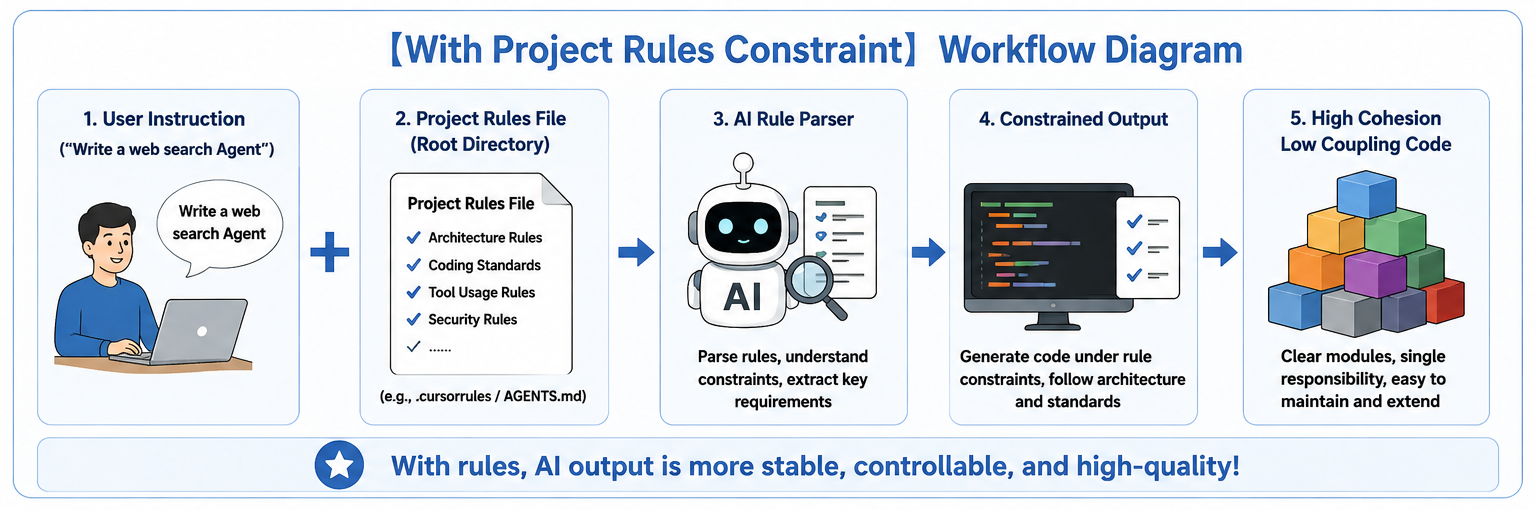
These rules participate in the AI coding process as persistent project context or instructions, continuously influencing code generation, modification, and Agent behavior.
1. How Mainstream AI Coding Tools Define Project Rules
Different tools vary in file names and rule mechanisms, but the essence is the same: Turn the standards that originally relied on engineers’ memory into project constraints that AI can read continuously.
Here are the most common configuration approaches today:
| Tool | Common Project Rule File | Primary Purpose |
|---|---|---|
| Cursor | .cursor/rules/*.mdc | Project-level / path-level rules |
| GitHub Copilot | .github/copilot-instructions.md | Repository-level rules |
| GitHub Copilot | .github/instructions/*.instructions.md | Path-level rules |
| Windsurf | .windsurf/rules/*.md | Workspace / path-level rules |
| General Agent | AGENTS.md | Project or directory-level rules |
2. How to Write a High-Constraint Python Rule File
What AI needs are specific, explicit, and verifiable rules — rules where you can clearly tell whether they’ve been violated.
❌ Vague rule:

- Please keep the code elegant and loosely coupled.

✅ Explicit rule:

- `routers/` only handles HTTP requests and responses, and must not directly access the database.
A standard Python engineering rule file should include the following 4 core modules:
| Module | Question Answered |
|---|---|
| Project Context | What kind of project is this? |
| Architecture Boundaries | Where should each type of code go? |
| Coding Standards | How should the code be written? |
| Validation & Safety | What things must not be done? |
Example: Python Project Rule File
When generating or modifying code, follow the project rules below.


## 1. Project Context

Tech stack:

- Python 3.11+
- FastAPI
- Pydantic v2
- SQLAlchemy 2.x
- Pytest

Priorities:

- Clear responsibilities
- Type safety
- Testability
- Loose coupling

Do not introduce new third-party dependencies unless explicitly needed.


## 2. Architecture Boundaries

The project follows:

Router → Service → Repository → Database

Responsibilities:

- `routers/`: Handle HTTP requests, parameter validation, and responses
- `services/`: Handle business logic
- `repositories/`: Responsible for database access
- `schemas/`: Define Pydantic input/output models
- `models/`: Define database ORM models

Prohibited:

- Routers directly accessing the database
- Services directly executing SQL
- Repositories containing business logic
- Repositories calling Services in reverse
- Services depending on Routers


## 3. Coding Standards

- Public functions must provide complete type hints
- API input/output must use Pydantic for validation
- External dependencies such as databases and HTTP clients must be provided through parameters or dependency injection
- Prefer `async / await` for I/O operations
- Hardcoding API keys, passwords, and other sensitive configurations is prohibited
- Prioritize reusing existing components; avoid duplicate code
- Do not over-engineer for "what might be needed later"


## 4. Validation & Safety

- All external input must be validated
- Silently swallowing exceptions with `except Exception: pass` is prohibited
- Use ORM or parameterized queries for databases
- Writing passwords, tokens, or API keys into source code or logs is prohibited
- Use high-risk operations such as `shell=True`, `eval()`, and `exec()` with caution


## When AI Modifies Code

Before modifying code:

1. First determine which layer the code belongs to
2. Check whether a reusable implementation already exists in the project
3. Only modify the code necessary to complete the current task

If a user's request conflicts with the existing architecture:

**First point out the conflict and risks, then provide an implementation plan that conforms to the existing architecture.**
Many advanced Agents already have project rules built in and reinforced. When using them in practice, trim as needed.
3. Project Rules Are Guardrails, Not Compilers
One thing to pay special attention to:
Project rules can improve the consistency of AI output, but they cannot guarantee that AI will follow them 100%.
Truly reliable engineering constraints should be:
AI generates code
     ↓
Lint (code style check)
     ↓
Type Check (type checking)
     ↓
Unit Tests (unit testing)
     ↓
Security Check (security scanning)
     ↓
CI (automatically runs the above checks)
     ↓
Pass → Allow merge
Fail → Reject merge
Project rules are responsible for telling AI what to do; testing and inspection tools are responsible for checking whether it actually did it.
Different AI coding tools already have varying degrees of built-in code standards, context management, and security mechanisms, so real projects don’t need to mechanically copy templates. Only keep the rules that you truly need AI to follow long-term.
Project rules are not about “the more the better” — the clearer, more stable, and more project-aligned they are, the better.
Conclusion
The value of Project Rules is not to make AI “write prettier code,” but to make it consistently work according to the same set of engineering rules.
It takes the conventions that originally lived in the architect’s head: Project Context, Architecture Boundaries, Coding Standards, Validation & Safety
And transforms them into project context that AI can read continuously.
Architecture is responsible for defining boundaries, project rules are responsible for telling AI what those boundaries are, and testing and inspection tools ensure the boundaries are not breached.
🪐 Good luck 🪐