With the development of large language models such as GPT, Claude, Gemini, and Qwen, software development is entering a new era. Coding tasks that once took hours or even days can now be completed by AI in a matter of minutes. However, many teams have noticed a puzzling phenomenon:
The more code gets written, the faster the project falls apart.
The reason is not that AI isn’t smart enough, but rather:
A lack of architectural constraints.
One important reason modern AI Agents can operate relatively stably is that: they do not let large language models run wild without any constraints.
Mature Agent systems typically define clear behavioral boundaries for the model through mechanisms such as System Instructions (i.e., system prompts), Tool Specifications (i.e., tool specs), permission control, workflows, state management, and result validation.
In essence, this is highly consistent with the philosophy of software architecture:
Define the boundaries and rules first, then let AI exercise its capabilities within those boundaries. Even a highly capable model, when lacking clear constraints, dealing with ever-expanding context, or wielding excessive tool permissions, may gradually develop issues such as format drift, responsibility overreach, incorrect tool invocations, or inconsistent code style.
📌 Technical Profile
Software Architecture The top-level structure and organizational principles of a software system. It defines:
- How the system is decomposed
- How modules collaborate
- How responsibilities are divided
- How the system evolves
The goal is to ensure that the software maintains the following qualities as it scales:
✅ Maintainable ✅ Scalable ✅ Testable ✅ Evolvable
💡 In a nutshell
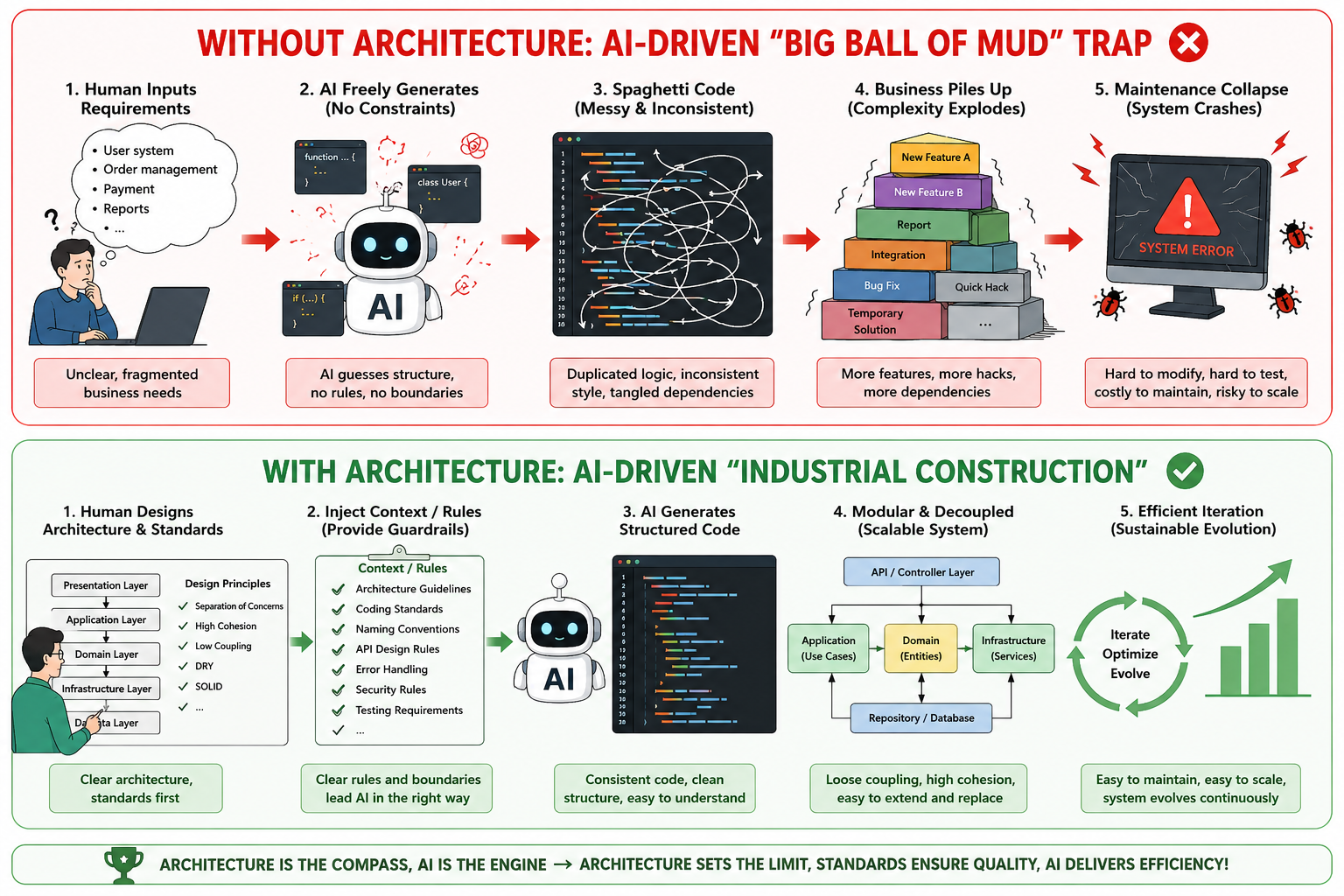
Architecture design is like a construction blueprint.
AI can be the fastest construction worker in the world, but without a blueprint, it will most likely just keep stacking bricks higher and higher…
1. Plain-Language Breakdown: Why Relying More on AI Means You Can’t “Let Go of the Reins”
If you’re not familiar with programming, think of writing code as “building a house”:
The old development model: You had to lay every brick yourself (write every line of code by hand). It was slow, but because you placed each brick personally, you knew exactly where the load-bearing walls were.
The AI model today: AI has become a construction worker with superhuman strength. You say “build me a kitchen,” and in half a minute it hauls over a stack of pre-built walls.
Sounds wonderful, right? But that’s exactly where the problem lies.
AI’s Inherent Shortcomings
1. AI Is “Near-Sighted” — It Naturally Lacks a Long-Term, Big-Picture Perspective
Modern AI programming tools can already read large numbers of project files and even search entire code repositories.
The real problem is:
AI’s judgment heavily depends on the Context it is currently given (i.e., the context, which has a length limit for large models).
If a project lacks clear module boundaries, architecture documentation, and engineering standards, it’s very difficult for AI to reliably infer the design intent of the entire system just from scattered code.
So when you ask it to “add one more feature,” it easily tends to prioritize the local solution that completes the current task most easily, rather than the solution best suited for the long-term evolution of the system.
2. Bad Structures Get Quickly Replicated and Amplified by AI
AI is very good at finding patterns from existing code.
This is normally an advantage, but it also means:
Good architecture gets replicated, and bad architecture gets replicated just the same.
If a project already has muddled responsibilities, duplicated code, and unreasonable dependencies, AI will likely follow these patterns and continue to spread them at a speed far exceeding manual coding.
A few dozen lines of “code smell” can quickly evolve into thousands of lines of unmaintainable “big ball of mud” code.
3. AI Won’t Automatically Fill In All Security Boundaries
AI’s primary task is usually to complete the current instruction, and many security requirements in a project don’t automatically appear in the prompt.
For example, if you only ask:
Write a login API endpoint.
Without further specifying the authentication method, password storage, input validation, permission model, and exception handling, the generated code — even if it “runs” — may not meet the security requirements of a production environment.
Therefore, security standards also need to explicitly become part of architectural constraints.
2. Architecture Standards: The New Role of Human Engineers
Now that the “heavy lifting” of coding has been taken over by AI, the role of human engineers, technical managers, and even cross-disciplinary developers has fundamentally shifted: you’ve been promoted from “bricklayer” to “chief construction commander.”
Core Idea: From “Doing It Yourself” to “Setting the Rules for AI”
In the era of AI programming, architecture design is the “code of conduct” you issue to AI:
- Draw boundaries (no wandering into others’ territory): Clearly tell AI that the code responsible for the UI must not directly touch the database, and the code responsible for billing must not mix in SMS-sending logic.
- Set standards (no cutting corners): Forbid AI from hardcoding database passwords in the source, and mandate that all errors must be returned in a unified format.
- Build the skeleton (fill-in-the-blank development): First, you or a standard architecture template erects the “reinforced concrete skeleton” of the building, so that AI only needs to “tile the floors” and “place furniture” in the designated rooms.
🎯 In a sentence
Give AI room to发挥 its abilities, but set clear boundaries first.
3. Turning Architecture Standards into Project Rules
In the past, architecture standards typically lived in design documents, Wikis, or architects’ heads. In the era of AI programming, an important change is: These standards can directly become project-level instructions that AI reads every time it writes code.
Modern AI IDEs (i.e., integrated development tools, such as Cursor, Windsurf, Claude Code, etc.) already support project-level rules.
For example:
- Cursor:
.cursor/rules/*.mdc - GitHub Copilot:
.github/copilot-instructions.md - General Agent spec:
AGENTS.md - Claude Code:
CLAUDE.md
These files are essentially:
Translating architecture documents into System Prompts (i.e., system prompts) that AI can understand.
This way, every time AI is about to generate code, it first checks this set of rules, making the model more consistently adhere to project conventions.
Example: Enterprise-Grade Python Architecture Rules
You are a senior Python architect who strictly follows enterprise-grade software engineering standards. When generating any code for this project, you must enforce the following **Three Architecture Principles**:
1. **No Responsibility Mixing (Layered Isolation)**
- The view/interface layer (Router) responsible for receiving user requests **must not** contain specific business computation logic or directly operate on the database.
- The core business logic layer (Service) must remain pure and **must not** be directly aware of the HTTP protocol or request details.


2. **Decoupling and Modularization**
- Replaceable infrastructure dependencies such as databases, HTTP clients, LLM clients, and repositories should not be hardcoded and instantiated within core business logic.


3. **Common Functionality Extraction and Type Safety**
- Use Pydantic for API boundaries, tool parameters, configuration objects, and data structures requiring runtime validation; prefer native Type Hints for simple internal module data.
- Common functionalities such as authentication, logging, and error handling must call existing shared components in the project — **never** write redundant code in business logic.


If a user's instruction would violate the above architecture principles, proactively remind the user and suggest improvements that comply with the architecture standards, rather than directly generating non-compliant code.
4. Practical Comparison
Requirement: Build an Agent that receives a user instruction (e.g., “List the files in the current directory”), automatically triggers a
bashtool to execute the command, feeds the command-line output back to the model, and ultimately returns a generated answer.
1. Without Architecture Constraints
If you simply tell the AI:
Write a Python script that calls OpenAI to execute a bash command and passes the result back to the model.
AI will very likely stuff SDK initialization, JSON Schema authoring, tool execution, and the two-step conversation loop all into a single function without a second thought:
❌ AI running free: all logic crammed into one function.
import os
import json
import subprocess
from openai import OpenAI

def process_user_request(user_prompt: str) -> str:
    # 1. Tight coupling: the business flow directly depends on the OpenAI SDK and a specific model
    client = OpenAI(api_key=os.environ.get("OPENAI_API_KEY"))

    messages = [{"role": "user", "content": user_prompt}]
    # 2. Messy data structures: tool definitions hardcoded inside the function
    tools = [{
        "type": "function",
        "function": {
            "name": "run_bash",
            "description": "Run bash commands",
            "parameters": {
                "type": "object",
                "properties": {"command": {"type": "string"}},
                "required": ["command"]
            }
        }
    }]

    # First LLM request
    response = client.chat.completions.create(
        model="gpt-4o", messages=messages, tools=tools
    )
    response_message = response.choices[0].message

    # 3. Hardwired control flow: hand-written, verbose tool_calls triggering and result-passing logic
    if response_message.tool_calls:
        messages.append(response_message)
        for tool_call in response_message.tool_calls:
            if tool_call.function.name == "run_bash":
                args = json.loads(tool_call.function.arguments)
                # Bare subprocess run, no directory sandboxing or exception protection
                result = subprocess.check_output(args["command"], shell=True).decode()

                messages.append({
                    "role": "tool",
                    "tool_call_id": tool_call.id,
                    "content": result
                })

        # Second LLM request: feed the result back to regenerate an answer
        final_response = client.chat.completions.create(
            model="gpt-4o", messages=messages
        )
        return final_response.choices[0].message.content

    return response_message.content
2. With Architecture Constraints
If following the architecture design standards of miniagent:
Tools are independently decoupled via the `@tool` decorator (high cohesion); the Agent and LLMClient are composed through dependency injection (low coupling); the Tool Call loop is automatically orchestrated inside the Agent.
✅ miniagent: each module has a single responsibility, the code organization is clean and extremely concise.
# 1. Independent tool module (tools.py): type-safe, isolated workspace
from pydantic import BaseModel, Field
from miniagent.tools import tool
import subprocess

class BashInput(BaseModel):
    command: str = Field(description="The bash command to execute")

@tool(name="bash", description="Execute a bash command with the specified working directory")
def create_bash_tool(workspace: str = "./"):
    def execute(input_data: BashInput) -> str:
        # Specify a default working directory; note: cwd is not equivalent to a security sandbox
        return subprocess.check_output(
            input_data.command, shell=True, cwd=workspace
        ).decode()
    return execute
# 2. Core runtime module (main.py): model and Agent decoupled, pipeline in two lines
import asyncio
from miniagent import Agent, LLMClient
from tools import create_bash_tool

async def main():
    # 1. Dependency injection: LLM is independently abstracted — switching to DeepSeek or Anthropic only needs a config change
    llm = LLMClient(provider="openai", model="gpt-4o")

    # 2. Composition and assembly: the Agent automatically manages the model, system prompt, and tool set's callback loop
    agent = Agent(
        llm_client=llm,
        tools=[create_bash_tool(workspace="./sandbox")]
    )

    # 3. Minimal interaction: automatically completes [call LLM -> execute tool -> pass back result -> output final answer]
    result = await agent.run("List the files in the current directory")
    print(result.final_answer)

if __name__ == "__main__":
    asyncio.run(main())
Side-by-Side Comparison of the Same Functionality
| Dimension | ❌ No clear architecture constraints | ✅ With clear architecture constraints |
|---|---|---|
| Responsibility boundaries | Easily drifts with each new requirement | Clear module responsibilities |
| Swapping the LLM | Business code bound to the SDK | LLMClient isolates the specific provider |
| Adding new tools | Schema and Tool Loop keep piling up | Tools registered independently |
| Tool loop | Maintained by business code itself | Handled uniformly by the Agent Runtime |
| Testability | Components hard to isolate | Tool / Client / Agent can be tested separately |
| AI output consistency | Different sessions easily adopt different structures | Rules + architecture template constrain the output |
Conclusion: AI Boosts Speed, Architecture Determines Direction
Large language models have changed how code is produced, but they haven’t changed the fundamental laws of software engineering.
What determines whether a system can evolve over the long term is still:
- Architecture design
- Module boundaries
- Engineering standards
- System abstraction
AI accelerates development; architecture determines how far the software can go.
⭐ The New Division of Labor Between Humans and AI
AI is better at micro-level implementation:
- Writing functions
- Writing modules
- Writing CRUD
- Filling in tests
- Refactoring local code
Humans should focus on macro-level decisions:
- Understanding the business
- Designing the architecture
- Dividing modules
- Setting constraints
- Reviewing key decisions
The architecture plan itself can certainly involve AI in the design and discussion.
But the final decision on what the system should look like — and the accountability for that decision — should still rest with humans.
Architecture is not a shackle on AI; it is the boundary and navigation system that enables AI to perform at a high quality.
🪐 Good luck 🪐